


Your Professional USB 2.0 Camera Supplier!
D-Vitec provides USB 2.0 camera solutions for kiosks, access control, industrial equipment, medical and laboratory devices, smart terminals, document imaging, and other embedded vision applications. Our product portfolio includes 1.3MP, 2MP, 3MP, and 5MP single-camera solutions, as well as dual 2MP and dual 5MP camera configurations for applications requiring synchronized or multi-view image capture.
-
![Coin Dimension 0.3Mp USB Camera]() Coin Dimension 0.3Mp USB CameraThe Coin Dimension 0.3Mp USB Camera is an ultra-compact, board-level vision module featuring a 1/4-inch CMOS sensor and USB 2.0 interface. It delivers VGA video at 30fps with real-time streaming.
Coin Dimension 0.3Mp USB CameraThe Coin Dimension 0.3Mp USB Camera is an ultra-compact, board-level vision module featuring a 1/4-inch CMOS sensor and USB 2.0 interface. It delivers VGA video at 30fps with real-time streaming. -
![1.3Mp USB Camera]() 1.3Mp USB CameraThe 1.3 Megapixel USB 2.0 camera module built on a 1/3 CMOS sensor designed for embedded vision systems.
1.3Mp USB CameraThe 1.3 Megapixel USB 2.0 camera module built on a 1/3 CMOS sensor designed for embedded vision systems. -
![Full HD Standard ATM Camera]() Full HD Standard ATM CameraFull HD Standard ATM Camera is a compact USB camera module featuring a 1/2.7 HD CMOS sensor with 1920×1080 resolution. It delivers Full HD video for ATM monitoring, self-service terminals, kiosks,
Full HD Standard ATM CameraFull HD Standard ATM Camera is a compact USB camera module featuring a 1/2.7 HD CMOS sensor with 1920×1080 resolution. It delivers Full HD video for ATM monitoring, self-service terminals, kiosks, -
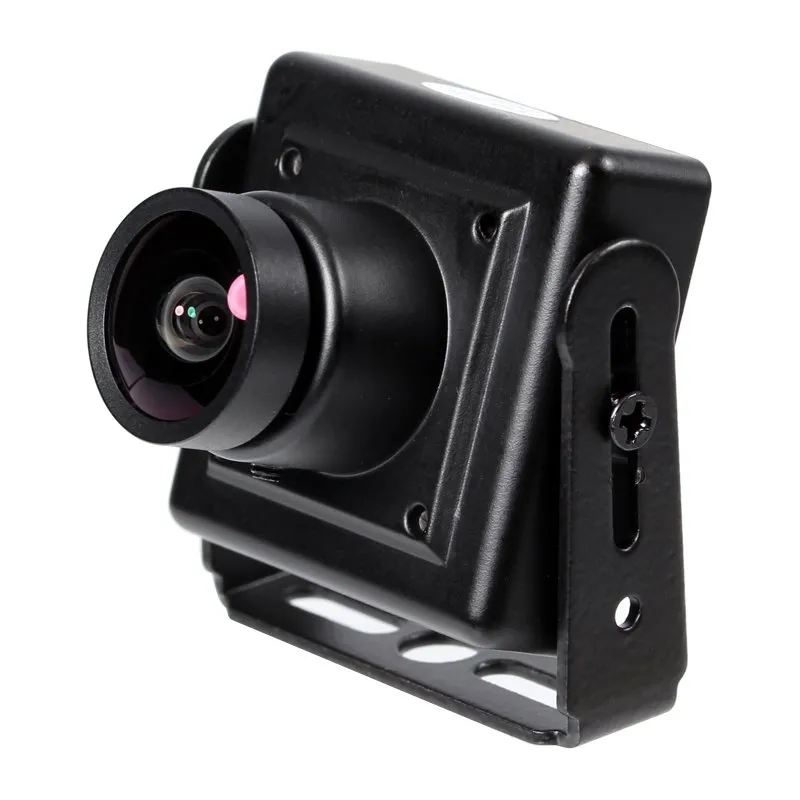
![2Mp FULL HD USB Kiosks Camera]() 2Mp FULL HD USB Kiosks CameraThis 2Mp FULL HD USB Kiosks Camerais a compact 28x28mm Full HD USB camera module engineered to capture clear 1080p video at 30 frames per second.
2Mp FULL HD USB Kiosks CameraThis 2Mp FULL HD USB Kiosks Camerais a compact 28x28mm Full HD USB camera module engineered to capture clear 1080p video at 30 frames per second. -
![3Mp USB Kiosk Camera]() 3Mp USB Kiosk CameraThe 3MP USB Kiosk Camera is an industrial-grade digital image capture module designed for integrated self-service terminals and automated kiosks.
3Mp USB Kiosk CameraThe 3MP USB Kiosk Camera is an industrial-grade digital image capture module designed for integrated self-service terminals and automated kiosks. -
![3Mp USB HDR Camera]() 3Mp USB HDR CameraThe 3Mp USB HDR Camera is an embedded digital imaging module engineered to capture precise visual data in extreme light-contrast environments.
3Mp USB HDR CameraThe 3Mp USB HDR Camera is an embedded digital imaging module engineered to capture precise visual data in extreme light-contrast environments. -
![5Mp NIR USB Kiosks Camera]() 5Mp NIR USB Kiosks CameraThe 5MP NIR USB Kiosks Camera is an embedded USB camera module designed to capture high-definition facial images under visible light and low-light environments.
5Mp NIR USB Kiosks CameraThe 5MP NIR USB Kiosks Camera is an embedded USB camera module designed to capture high-definition facial images under visible light and low-light environments. -
![Dual 2Mp Lens NIR USB Camera]() Dual 2Mp Lens NIR USB CameraDual 2Mp Lens NIR USB Camera is a dual-sensor USB 2.0 camera module featuring synchronized 2MP CMOS image sensors, 850nm near-infrared illumination, and UVC compatibility. It captures visible and NIR
Dual 2Mp Lens NIR USB CameraDual 2Mp Lens NIR USB Camera is a dual-sensor USB 2.0 camera module featuring synchronized 2MP CMOS image sensors, 850nm near-infrared illumination, and UVC compatibility. It captures visible and NIR -
![Dual 5Mp Lens NIR USB Camera]() Dual 5Mp Lens NIR USB CameraDual 5Mp Lens NIR USB Camera is a dual-sensor USB camera module featuring 5MP CMOS imaging, 850nm near-infrared illumination, and UVC compatibility. It provides synchronized visible and NIR image
Dual 5Mp Lens NIR USB CameraDual 5Mp Lens NIR USB Camera is a dual-sensor USB camera module featuring 5MP CMOS imaging, 850nm near-infrared illumination, and UVC compatibility. It provides synchronized visible and NIR image


Technical Parameters
|
Feature |
Specification / Description |
|
Camera Signal |
N / P |
|
Scanning System |
Progressive scan |
|
Scanning Frequency (H) |
30 Hz |
|
Scanning Frequency (V) |
59.9 Hz |
|
Image Sensor |
1/4" CMOS |
|
Effective Pixels |
640 × 480 |
|
Pixel Size |
5.6 µm × 5.6 µm |
|
Image Sensor Data Output |
Parallel 10-bit Raw Data |
|
Maximum Frame Rates |
640×480 @ 30 fps, 352×288 @ 30 fps, 320×240 @ 30 fps, 176×144 @ 30 fps, 160×120 @ 30 fps |
|
SNR Max |
≥50 dB |
|
Dynamic Range |
≥74.8 dB |
|
Minimum Illumination |
0.1 LUX |
|
Video Compressor |
MJPG / YUY2 |
|
Digital Interface |
5-pin 1.25 mm USB 2.0 |
|
Transfer Rates |
480 Mb/s (UVC) |
|
Power Requirements |
5 V ±5% |
|
Power Consumption |
Max 0.4 W |
|
Dimensions (PCBA) |
14.2 × 14.2 mm ±5% |
|
Weight |
TBD |
|
Operating Temperature |
-20 ~ 50 ℃ |
|
Storage Temperature |
-40 ~ 80 ℃ |
|
Compliance |
USB-IF, WHQL, CE, RoHS |
|
Lens Mount |
M12 × 0.5 mm Pin Hole |
|
Lens View |
M12 / 90° |
|
Warranty |
3 years |
|
Supported OS |
Windows XP / 7 / 8.1 / 10 / Vista / Mac / Linux 2.6.2 (UVC included) |
|
USB Connection Pins |
2: DM, 3: DP, 4: GND, 5: COVER |
|
Remarks |
Signal |
How to Choose the Right USB 2.0 Camera
Higher resolution is not automatically better for every project. The appropriate camera should be selected according to actual image-detail requirements, target size, working distance, field of view, frame rate, USB bandwidth, host processing performance, storage requirements, and project cost.
|
Camera Type |
Image Detail |
Data Requirement |
Typical Positioning |
Recommended Applications |
|
1.3MP |
Basic to moderate |
Lower |
Cost-efficient imaging |
Basic terminals, general embedded systems |
|
2MP |
Full HD-class on applicable models |
Moderate |
Balanced performance |
Access control, kiosks, smart devices |
|
3MP |
Increased detail |
Moderate to higher |
Enhanced imaging |
Document capture, identification, inspection |
|
5MP |
High detail |
Higher |
Detail-focused imaging |
Industrial, laboratory, specialized equipment |
|
Dual 2MP |
Two 2MP imaging channels |
Higher |
Multi-view imaging |
Stereo vision, dual-view systems, smart terminals |
|
Dual 5MP |
Two 5MP imaging channels |
Significantly higher |
Advanced multi-view imaging |
High-detail inspection, research, specialized systems |
Multiple Resolution Options:From 1.3MP and 2MP cameras for general embedded applications to 3MP and 5MP solutions for higher-detail imaging, D-Vitec offers multiple resolution levels for different technical and commercial requirements.
Single & Dual-Camera Configurations:In addition to conventional single-camera solutions, dual 2MP and dual 5MP configurations support projects requiring multiple viewing angles or application-specific multi-camera architectures.
USB 2.0 Connectivity:The USB 2.0 interface provides convenient integration with compatible computers, industrial PCs, embedded platforms, and smart terminals, subject to operating system, driver, bandwidth, and software compatibility.
Flexible Lens Selection:Different lens options can be evaluated according to field of view, working distance, target dimensions, installation space, and required image detail.
Compact Integration Options:Depending on the selected model, USB cameras can be integrated into kiosks, terminals, access control equipment, industrial devices, laboratory systems, and other space-constrained equipment.
Custom Cable & Connector Options:Cable length, USB connector type, cable routing, and related connection configurations can be customized according to installation and equipment requirements.
Application Scenarios
D-Vitec USB 2.0 cameras can be integrated into a wide variety of equipment and vision systems. The appropriate resolution and configuration depend on required image detail, installation space, target distance, field of view, lighting, frame rate, and software environment.
Access Control & Biometric Devices
2MP and higher-resolution USB cameras can support image acquisition for access control terminals, facial imaging devices, identity verification systems, and other biometric equipment, depending on system requirements.
Self-Service Kiosks & Smart Terminals
Compact USB cameras can be integrated into payment terminals, information kiosks, vending systems, ticketing equipment, registration terminals, and other interactive devices.
Industrial Equipment & Machine Vision
USB cameras can provide image acquisition for equipment monitoring, visual inspection, positioning, measurement support, code recognition, and other industrial applications where the camera specifications match the vision task.
Video Communication Equipment
2MP cameras can support video terminals, conferencing systems, interactive equipment, and other communication applications requiring integrated video capture.
Multi-Stage Quality Control for Consistent USB Camera Performance
D-Vitec applies quality control throughout component inspection, camera assembly, image testing, functional verification, aging evaluation, and final shipment inspection to support consistent performance across standard products, customized projects, and repeat bulk orders.
Incoming Component Inspection:Key components and materials are checked according to applicable specifications before entering production. Depending on the camera configuration, these may include image sensors, lenses, lens holders, PCBs, electronic components, USB cables, connectors, housings, and packaging materials.
PCB & Assembly Inspection:During production, critical solder joints, electronic component positions, sensor installation, connectors, cable connections, and assembly details are checked to help reduce manufacturing defects.
Resolution & Image Output Verification:Applicable cameras are tested to confirm image output and the configured resolution according to the selected model, whether 1.3MP, 2MP, 3MP, 5MP, dual 2MP, or dual 5MP.
Focus & Image Clarity Testing:Focus and image clarity are checked according to the camera configuration and intended working distance. For customized applications, sample testing can be performed using customer-defined target distances and imaging requirements where technically feasible.
Color & Exposure Inspection:Applicable image parameters such as brightness, color reproduction, contrast, exposure, and white balance behavior can be checked according to the selected camera platform and test requirements.
USB Connectivity Testing:USB connection and image transmission are verified under defined test conditions. Actual performance may also depend on the host computer, operating system, USB controller, cable length, software, image format, and system architecture.
Frame Rate Verification:Where required, frame rate can be checked according to the selected resolution, sensor, output format, and camera configuration. Buyers should note that actual frame rate may vary depending on USB bandwidth and host-system conditions.
Dual-Camera Functional Testing:For dual 2MP and dual 5MP configurations, both camera channels are checked according to the selected architecture. Where synchronization or simultaneous image acquisition is required, these requirements should be confirmed during project evaluation rather than assumed from the dual-camera structure alone.
Aging & Stability Verification:Selected products may undergo continuous operation or aging tests according to model, project, and order requirements to help identify potential early-stage failures before shipment.
Final Inspection & Batch Traceability:Before packaging, finished cameras are checked for appearance, image output, focus, cable and connector condition, labeling, accessories, packaging, and quantity. Production and inspection records can be maintained according to internal procedures to support batch management and after-sales investigation.

Established in 2002, D-Vitec has accumulated extensive experience in camera products and related imaging solutions. With more than 10 production lines and approximately 1,000 m² of production space, we support equipment manufacturers, solution providers, system integrators, distributors, and OEM customers with standard USB cameras, customized camera configurations, samples, and repeat bulk production.
Packaging & Global Logistics
USB cameras contain optical components, electronic assemblies, PCBs, lenses, cables, and connectors that require suitable protection during storage and international transportation. D-Vitec provides packaging solutions for standard cameras, customized modules, samples, OEM products, and bulk orders.
Individual Product Protection
Depending on the product structure, cameras can be packed with suitable internal protective materials to reduce movement, impact, scratches, lens contamination, PCB damage, and connector deformation during handling and transportation.
Anti-Static Protection
For exposed camera modules or electronic assemblies, appropriate anti-static packaging can be considered according to product structure and shipment requirements.
Standard Export Cartons
Products are packed into suitable export cartons according to camera dimensions, quantity, accessories, cable configuration, and transportation requirements.
Global Shipping Support
Depending on order volume, urgency, destination, and customer preference, shipments can be arranged through express courier, air freight, sea freight, or other available transportation methods.
FAQ
We are one of the most professional usb 2.0 camera manufacturers and suppliers in China, also support customized service with low price. We warmly welcome you to buy discount usb 2.0 camera made in China here from our factory. Contact us for quotation.
usb 2 0 camera, 5Mp NIR USB Kiosks Camera, Coin Dimension 0 3Mp USB Camera


